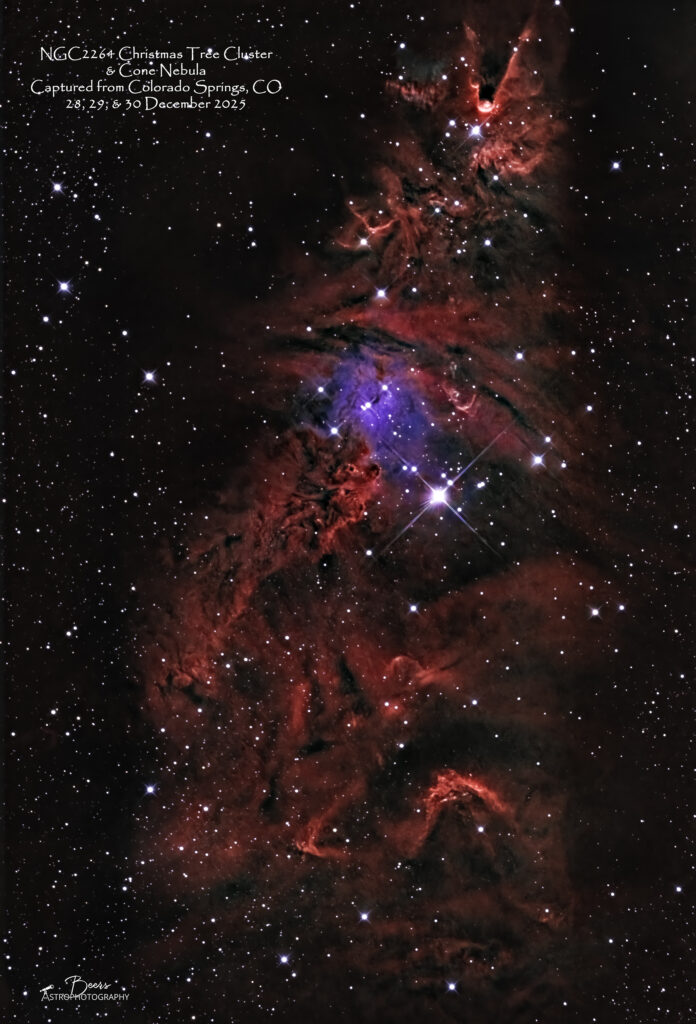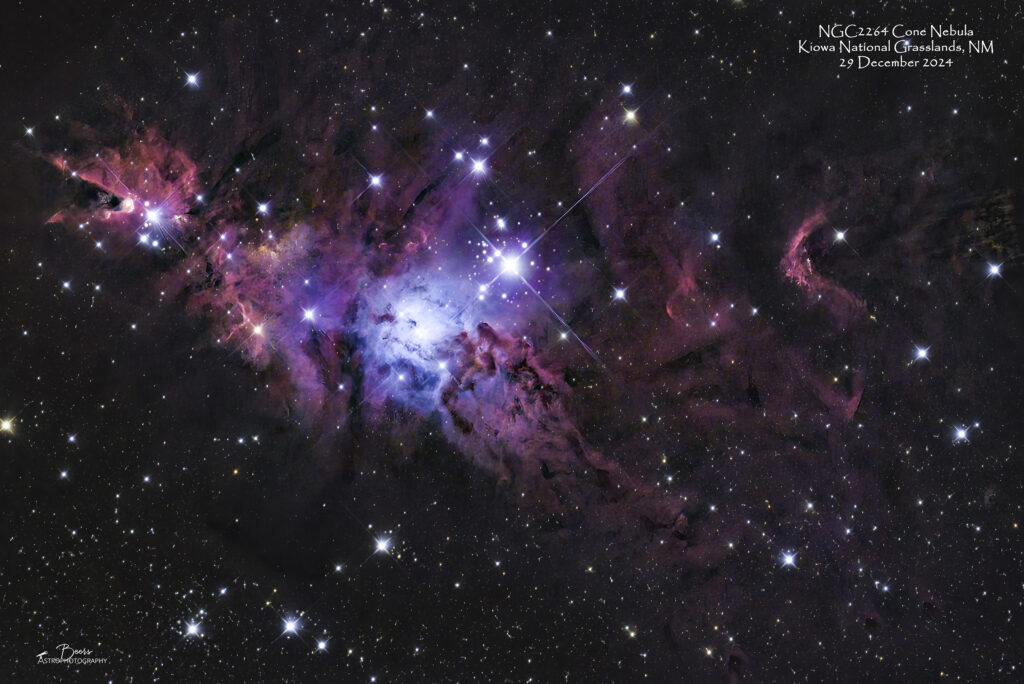
I spent my 12 Nights of Christmas imaging from our front patio with Big Bertha and the latest addition to my astrophotography arsenal – the ZWO ASI6200MM mono camera and 7×2″ filter wheel. There were a lot of equipment, software, and processing hurdles to overcome…but, when it was all said and done, there are images to show for the effort! I’ll let you be the judge (and ask you to share your opinion) of whether you prefer the dark skies color camera images or their mono counterparts.

The story up until this point of my mono data capture and processing struggles…
My mid-November (15Nov2025) blog described my first foray into mono imaging and processing with the QHYCCD Mono Mini and the switch to the ZWO ASI6200MM mono camera and ZWO 7×2″ filter wheel from early June through mid November 2025. Check out: https://beersastrophotography.com/photography-journals/the-plunge-into-mono-imaging-second-times-a-charm/ for a full accounting of that saga and “first light” images of the OU-4 Giant Squid (the blue section of the SH2-129 Flying Bat)…
My early January (2Jan2026) blog described “second light” data collection with my new ZWO ASI6200MM mono camera and ZWO 7×2” Electronic Filter Wheel (on the Southern Cross). With that story, I mostly focusing on the bumpy road I’ve started down with mono image processing. Check out: https://beersastrophotography.com/photography-journals/dialing-in-my-mono-data-collection-and-processing/ for the story and the “second light” image – a first mono image of the SH2-240 Spaghetti Nebula…
In the 2Jan2026 blog, I alluded to other images to come from the data collected during the clear nights we had between the 21st and 30th of December. I may have also alluded to some of the technical challenges that the equipment presented during those nights of imaging…things like focusing and data download issues. But I spared you the gory details (until now!).
As with other blogs, I’ll offer an off-ramp for those of you who really are just interested in seeing the images. (I can’t say that I blame you!).
But I will ask a favor…as I mentioned before, I’m not certain I’m completely sold on this whole mono imaging idea. Not only does it increase the data collection time 3x, 4x, or 7x (depending upon how many filters an image demands) but the processing complexity, at least at this point with my nascent skills, feels a bit overwhelming. It’s especially overwhelming (and discouraging) when you enter into the process with a color camera’s image in mind and a desire to replicate it using your mono data. (Much like my experience of going shopping with an idea of the blouse or dress I plan to purchase – and just not finding it!!)
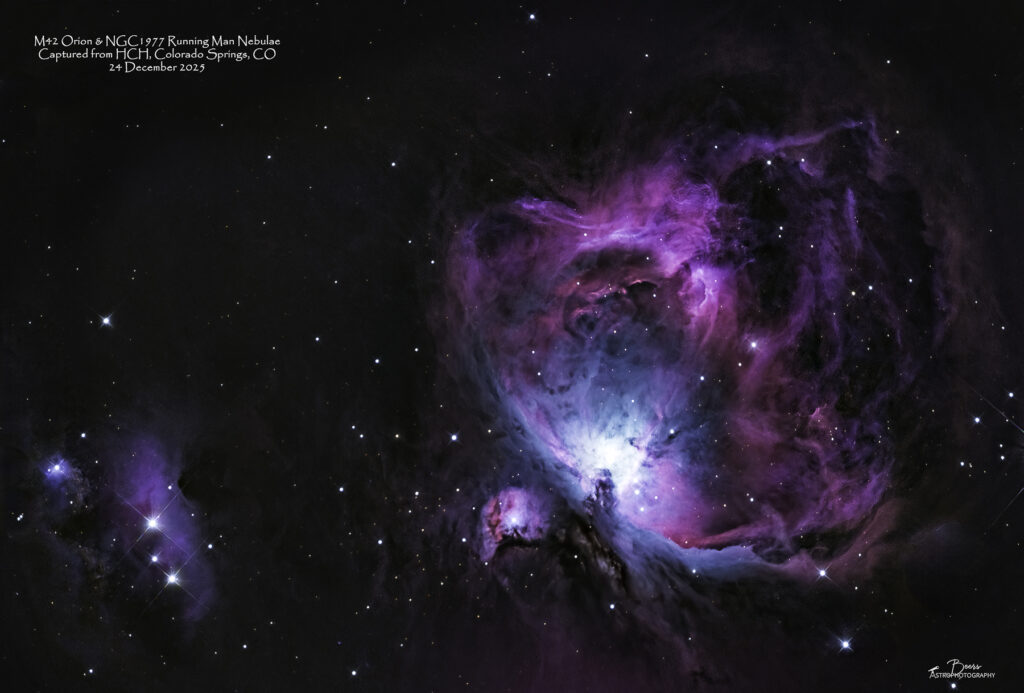
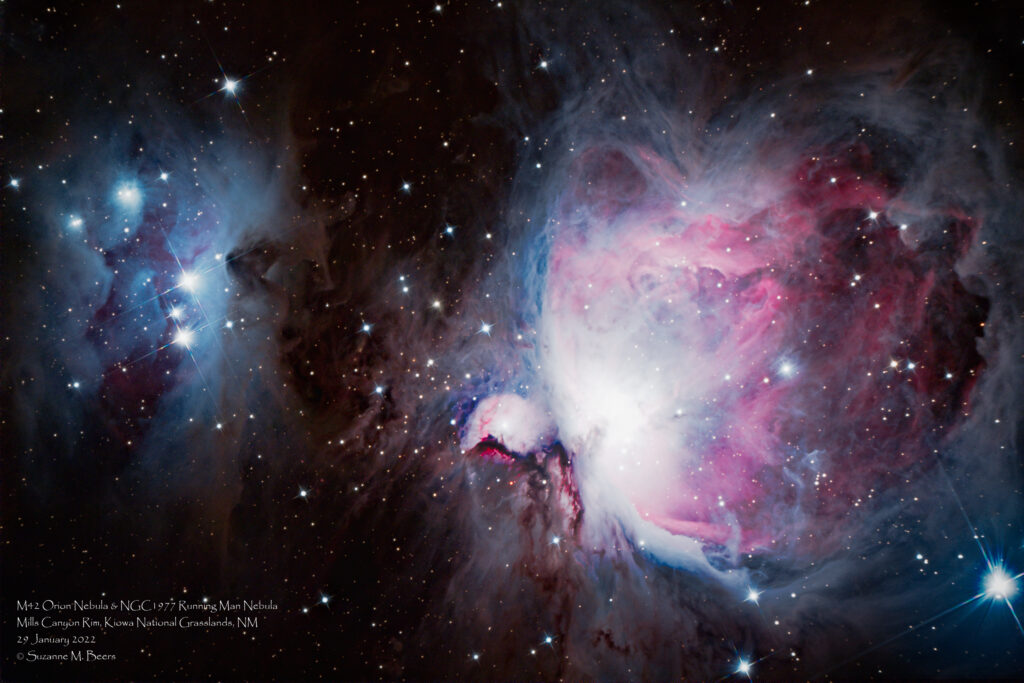
So – you tell me – in each of the galleries is the mono image that I’ve processed in an “RGB palette” (i.e., to look like the color camera’s image or what it “really” looks like if we could see it with our naked eye) and a corresponding image of the same object captured in dark skies with my OSC camera.
Do you think the juice is worth the squeeze?
M42 Orion Nebula at: https://beersastrophotography.com/gallery/m42-orion-nebula/
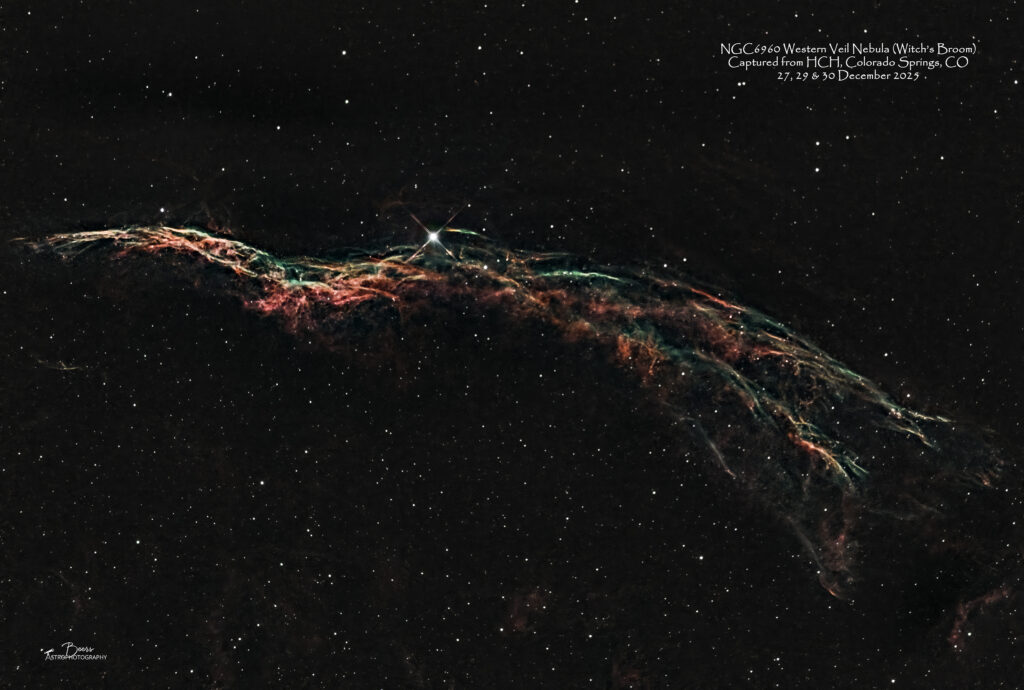
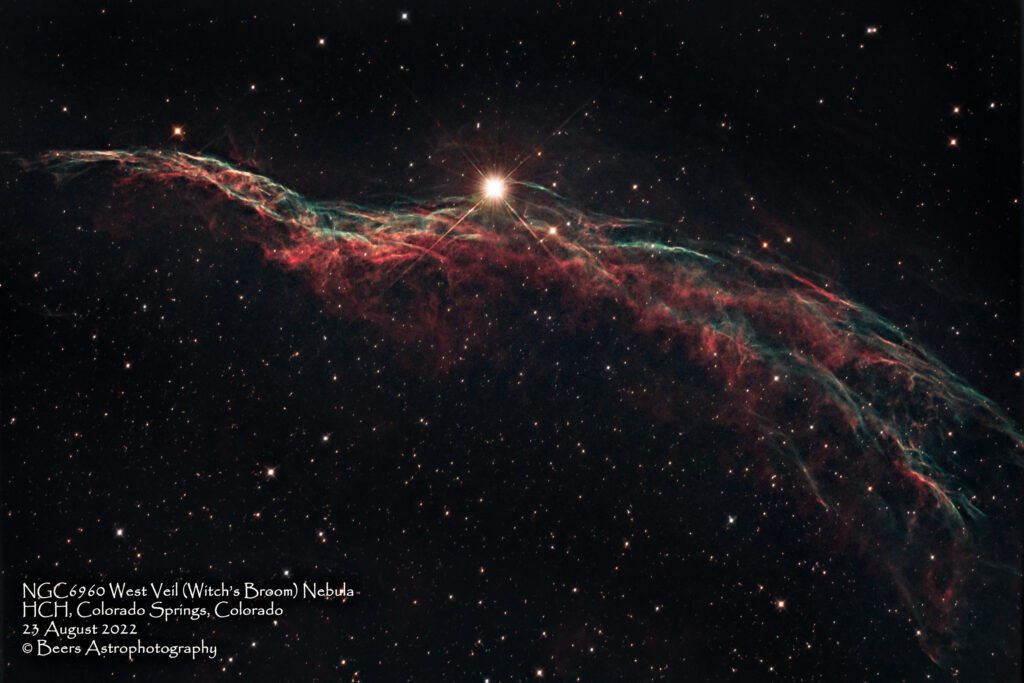
NGC6960 Western Veil (Witch’s Broom) Nebula at: https://beersastrophotography.com/gallery/ngc6960-west-veil-witchs-broom-nebula/
NGC2264 Christmas Tree Cluster and Cone Nebula at: https://beersastrophotography.com/gallery/ngc2264-christmas-tree-cluster-cone-nebula/
My 12 Nights of Christmas…
After a mostly cloudy month (and year!), Mother Nature gave us a Christmas gift of clear skies starting early in the week of Christmas. Let me give you the highlights of my challenges encountered – and overcome(!) during that period, then give you the side-by-side comparison of the images – to let you decide which you prefer.
The first day of Christmas (21Dec2025): Our stint of clear skies began on Sunday, 21 December. I decided I would switch the new ZWO ASI6200MM mono camera and filter wheel from the Southern Cross to Big Bertha (BB) to capture some of the winter constellations’ nebulae (e.g., Orion). Those targets (e.g., Orion, Cone, Witch’s Broom…) are better suited for capture with BB’s field of view (FOV) than the Southern Cross’ larger FOV. It took most of the day on Sunday to configure the new equipment for operation with Big Bertha, including software driver downloads, sequence builds, and attaching the camera/filter wheel to the telescope. I also spent a bit of time measuring and re-measuring to make sure (mixed with a healthy dose of self-doubt) that I had the correct back focus distance between the camera’s sensor and the field flattener. Finally, at the end of the day, I wheeled BB out onto the front patio for her chance at first light with the mono camera.
I began the night struggling with the electronic auto focuser (EAF). Since, I’d become accustomed to this EAF issue with the mono camera on the Southern Cross, I had reminded myself how I used to focus the telescope before I got the EAF – with a Bahtinov lens on a bright star. So, I started working on focusing with the Bahtinov lens on Orion’s bright star, Rigel. Once I had the telescope in focus using that “old school” method. I switched to using the EAF…and it failed! After repeating the process and having it fail again, I discovered that I need not have been worried about the field flattener, but instead the number of extension tubes I had attached between the end of Big Bertha and the camera/filter wheel. The 5” of extension tubes was at least 1” too much. While I was able to achieve focus on Rigel it was at the point where the telescope’s focuser was pressed right up against its zero point (i.e., had no more inward travel available). For the EAF algorithm to perform properly, one needs a bit of in and out movement of the focuser. (The EAF algorithm starts at the approximate in-focus point, moves out of focus in the outward direction, then moves inward through and past the in-focus point to create a parabola of focuser position vs. star size (focus) to determine the optimal focus position). I had no “in” movement available, so I was going to have to disassemble the camera from the telescope, take off part of the extension tube assembly, reassemble the camera onto the telescope (all while hoping this really was the issue and its solution). After being outside for a couple hours already, late on a “school night” I decided to call it a night. I rolled Big Bertha inside and went to bed (for a solid four hours of sleep!)
On the fourth day of Christmas: Christmas Eve night was our next clear night. By then, I had verified with my mentors (Ann Chavtur and Nico Carver) that removing an inch of the extension tube would likely solve the EAF focusing algorithm problem. I’d done the disassembly and reassembly (comfortably warm inside the house during daylight). I began the evening, as I had on Sunday, with a manual focusing exercise – this time on the star Betelgeuse (which is not quite as bright as Rigel, thus it’s easier to tell if you have achieved focus with the Bahtinov lens). I got the rig into near focus manually, then ran the Betelgeuse sequence; allowing me to watch the sequence start-up procedure (that includes two runs of the autofocus routine).
The EAF completed its routine successfully and began collecting 5×15 second subframes on the SII, Ha, and OIII filters. YEAH! …then I got an “Error capturing frame” message! (ARGH – it’s always something!!). I chose to ignore the frame capture errors and get the M42 Orion Nebula sequence started collecting data.
I got the sequence started at 20:37MST, came back out at 23:20 for the meridian flip, and ended the sequence at 03:12 when Orion set below 20°. When I copied the data off the control laptop on Christmas morning, I discovered that during the sequence run time of 6:35 hours I had only gathered approximately 5 hours of data. I reached out to SGP (the control SW developer) – who pointed me to the ASCOM community. ASCOM (Astronomy Common Object Model) is the API that allows different astronomy hardware (mounts, cameras, focusers) to communicate with various software (SGP, PHD2) using a consistent interface, removing device-specific coding and ensuring interoperability. Both SGP and ASCOM denied any responsibility for the issue I was having, while offering “helpful” (NOT) advice…make sure my cables were not frayed (on my brand-new camera??).
The fifth through the twelfth day of Christmas: I continued to collect data (and experience focus and data download issues) over the next few clear nights (25 Dec, 27 Dec) with less than stellar results. On 28 December I had a breakthrough with both issues and was able to gather much better data on the remaining clear nights (28 Dec, 29 Dec, and 30 Dec). To summarize, the rest of the story…
The focus issue was two-fold: 1) learning the correct focus frame exposure length for the narrowband filters. It turned out that 20 seconds for the Ha, SII, and OIII filters gives acceptable performance. It probably could be longer, since I’m still not getting the EAF algorithm to recognize all stars that I know are in the frame – but I don’t have the patience to increase it any more!; and 2) learning how to get the EAF algorithm to stop failing with its requirement for a 90% parabola curve fit to the focus points. That curve fit requirement was making most of the EAF runs fail – which was fine for when I was sitting watching and could tell it to go on with the next step. But it was completely impractical for EAF runs that were scheduled to occur throughout the night, hourly or at a filter change. After putting in a Help Ticket to SGP on 30Nov2025, (which two users responded to saying they were giving up on SGP and/or their EAF because of the same issue (!)), Ken finally responded with a “fix” (workaround)…
“It’s not in the UI, but you can override the 90% setting with what you consider to be a good (minimum) fit.
- In v4.4:
- Expand the equipment area in the sequencing form
- At the bottom, in the Variables field add “quadratic_fit_min_quality=0.7” or whatever you want (that example allows a min fit of 70%)
- In v4.5
- Open the Control Panel
- On the left scroll down to Variables
- Enter quadratic_fit_min_quality=0.7 in the text area on its own line”
The data collection issue bounced back and forth between SGP and ASCOM – each blaming the other (or my frayed cables). Until, on Saturday night (27Dec2025) – while I was experiencing the download issue in spades (one 5 minute exposure would download, there would be a 5-minute pause, then there would be another 5-minute exposure download), it dawned on me that perhaps all this was being caused by a camera firmware issue. As silly as that sounds – I’ve had several other brand-new pieces of equipment arrive in immediate need of a firmware update! So, after spending the time to document the issue (identifying the number of hours spent vs. the number of hours of data gathered) to submit a Help Ticket to SGP, I checked the ZWO (camera manufacturer) website. They have a firmware updater – but it comes with a bold warning “Do not use this if you are not having problems.” The warning went on to say “If you think you need to update your firmware, email us to get the latest version for your equipment.” I confirmed to myself that I was having problems so, I downloaded the firmware (as well as updated native and ASCOM camera drivers that were available) while I was on their website. I sent an email to ZWO describing the issue I was having (as directed) …and then unzipped the firmware updater package. As I was reading the “readme.txt” (I am a rule-follower AND an instruction reader!) I discovered it was meant for their autofocuser (EAF) and filter wheel (EFW), not their cameras. Since I was not having “firmware driven” issues with either my EAF or the EFW, I decided to just load the updated camera drivers and hold off until I heard back from them on my firmware theory.
I imaged on Sunday night (28Dec2025) with the updated camera drivers in place – and it seems to have solved the problem! Instead of “download a 5-min exposure, wait 5-minutes then begin the next exposure” the only pauses during the sequence run on 28Dec2025 were for the EAF routine and the meridian flip!!
Postscript on this issue…on 5Jan2026 (yes! – way outside my 12 Days of Christmas and 9 days after I solved the issue by loading the camera native and ASCOM driver updates) I received a response to my SGP Help ticket (asking what they were seeing in the logs that might indicate what the download problem could be):
“I can see the error pretty plainly in that, for reasons SGPro can’t know, the camera driver is alternately returning garbage data (i.e. every other frame gives SGPro unusable data)
[12/27/25 20:27:13.409][DEBUG][Camera Thread][SQ;CC;] ASCOM Camera Error : Unable to cast object of type 'System.Object' to type 'System.Int32[,]' at uz.i9(Image A_0, mh& A_1, mh[] A_2)

In plain speak, SGPro expects a series of integers representing 16-bit pixel values and instead receives something else.  Are you using the latest camera driver? The driver’s author might need to be involved here."
The processing which I described pretty thoroughly in the 2Jan2026 blog is starting to come together (the Witch’s Broom image took me about 3 hours from start to finish to process; compared to the Spaghetti Nebula that took most of my waking hours for 2-3 days and the Orion Nebula that took one full day)…with a melded old-new tools workflow that I never could have come up to without Ann Chavtur’s help! She turned me on to Seti Astro, which I am now using to do the image review and culling of the images before I stack. She also reminded me of the APP RGB Combine Tool and gave me tips on the combinations and slider values she’s been using in her processing.
To summarize my mono image workflow:
- Review and cull images using Seti Astro’s Blink Comparator (visually and then using their star metrics)
- Stack the good images using APP (Ann also let me in on the secret that APP is smart enough to separate the files, by filter, using the header data in the .FITS files – saving me the time and effort I’d been spending on doing that by hand)
- Use APP’s RGB Combine Tool to create a color image
- Remove stars from the combines images using Starnet++
- Take the STARLESS and Nebula+Stars images into Lightroom and Photoshop and process as normal
Okay, alright – show me the images!!
As I mentioned (now multiple times!) I’m still not sold on this mono imaging idea, but after getting through the processing of the three DSO’s data from my 12 Days of Christmas mono imaging extravaganza, I am beginning to see the potential for a great deal of artistic creativity. Once I figure out the intricacies of the processing, I’ll be able to create all sorts of variations…one data set could suck me in for days with the “what if I did this” game!
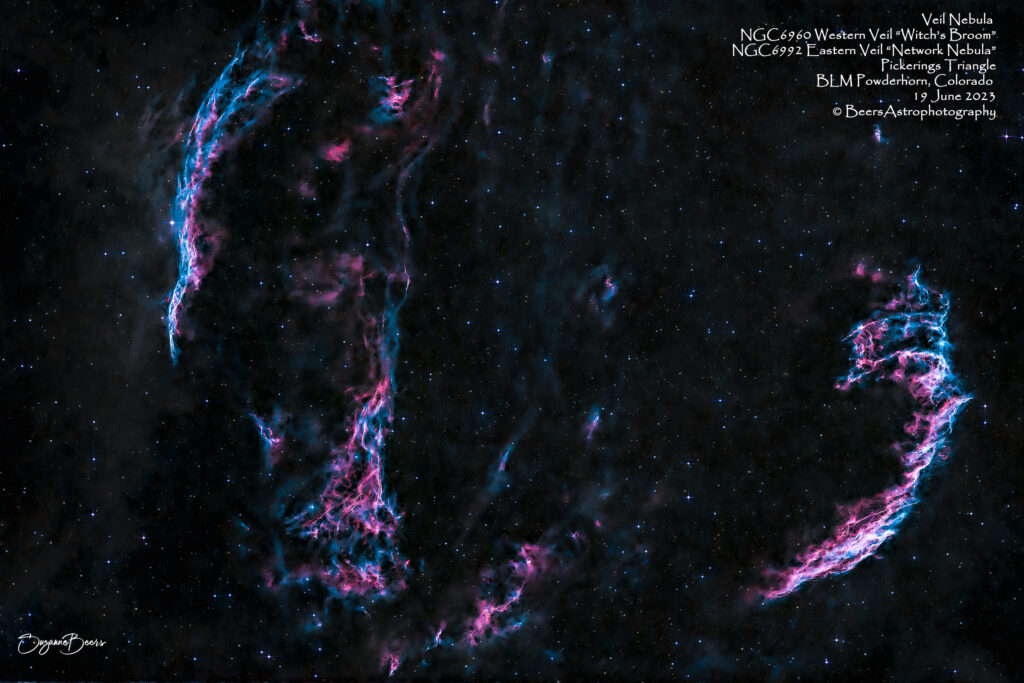
Below are the links to the gallery posts where these DSOs are housed and a side-by-side comparison of the mono camera’s image and the one shot color (OSC) camera image. In the Orion and Cone Nebulae cases, the OSC image was captured from dark skies. The Witch’s Broom (with Big Bertha) was captured from the HCH front patio with narrowband filters on the OSC camera (to cut down on the light pollution). But, I’ve also included a dark skies image of the entire Veil Nebula (which includes the Witch’s Broom) – so you can see what a dark skies OSC version looks like.
M42 Orion Nebula
M42 Orion Nebula gallery post is: https://beersastrophotography.com/gallery/m42-orion-nebula/
NGC6960 Western Veil (Witch’s Broom) Nebula
NGC6960 Western Veil (Witch’s Broom) Nebula gallery is: https://beersastrophotography.com/gallery/ngc6960-west-veil-witchs-broom-nebula/
…and a bonus view of the entire Veil Nebula from Powderhorn, Colorado’s dark skies
NGC2264 Christmas Tree Cluster and Cone Nebula
NGC2264 Christmas Tree Cluster and Cone Nebula gallery is: https://beersastrophotography.com/gallery/ngc2264-christmas-tree-cluster-cone-nebula/