
The summer project of collecting data on my “OCD” target—SH2-129 Flying Bat / Ou4 Giant Squid—continues! Once again, Mother Nature apparently got wind of our New Moon dark-skies trip plans and decided to fill the week leading up to the New Moon, and the weekend itself, with storms and clouds. On Friday night, 4 September, our renovation project’s stucco crew had finished their work and, thankfully, removed the scaffolding from in front of the front patio’s sliding glass door. The forecast was calling for a mostly clear night, so I decided to take advantage of both the newly re-accessible patio and the clear skies to get the telescope out and capture more 15-minute OIII subframes of the Flying Bat and Giant Squid. This image adds another approximately seven hours of OIII 15-minute subframes to the data included in the July edition (mono data from May, June, and July, plus OSC data from July 2025). I’d still love to get some dark-skies data into the mix—but for now, we’ll keep those plans under wraps!
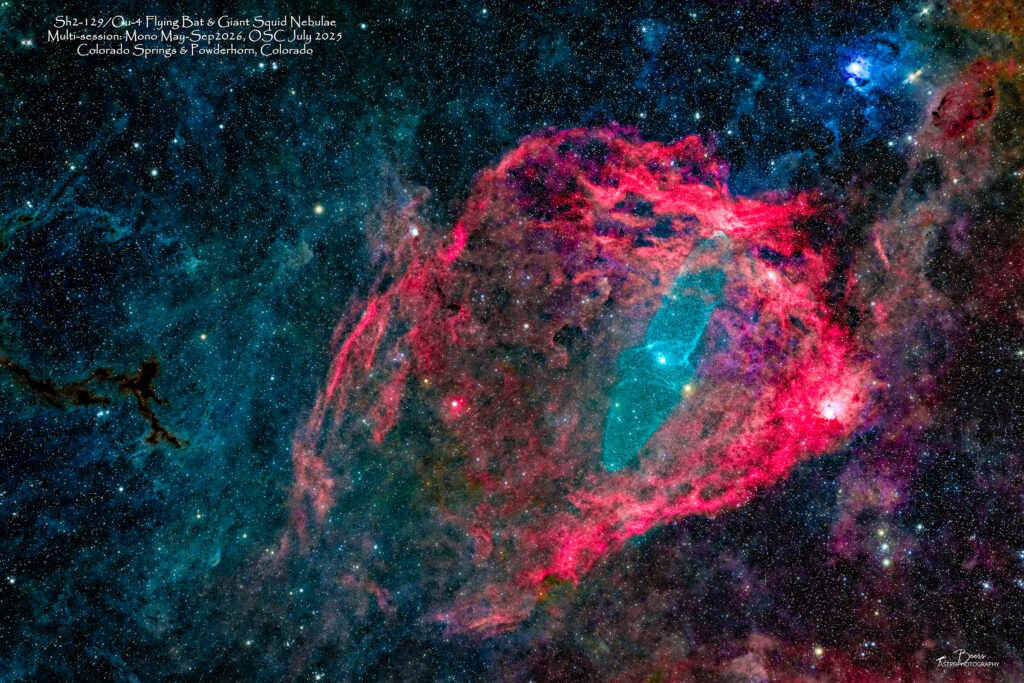
SH2-129 Flying Bat & Ou4 Giant Squid Nebulae
The SH2-129 Flying Bat & Ou4 Giant Squid Nebulae gallery (https://beersastrophotography.com/gallery/sh2-129-flying-bat-ou-4-giant-squid-nebulae/) shows the evolution of my imaging of this elusive pair. I have been intrigued by them, especially the faint Ou4 Giant Squid (the blue portion of the image that looks like a flying bat!) since I first saw Nico Carver’s version of it at: https://www.nebulaphotos.com/sharpless/sh2-129/ in 2023.
During the clear skies around the New Moon in July, I concentrated on collecting 15-minute OIII subframes – to see if that captured more of the Ou4 Giant Squid’s faint OIII signal than my previously collected 10-minute exposures. So, this month’s image is comprised of those 15-minute OIII subframes (77x15min collected on 11, 12, and 14Jul); all the Ha data I’d captured in May, June, and on the night of 13Jul26; and the RGB data I’d captured with the one shot color (OSC) camera in on 26 July 2025 at Powderhorn, Colorado.
I used slightly different APP RGB Combine algorithms this month – RGB1 for the dust background and the star field; HaRGB1 for the deeper red in the SH2-129 Flying Bat; and HOO1 for the Ou4 Giant Squid’s elusive OIII signal. I blended the three combined images together using clipping masks in Photoshop and LIghtroom to bring out the portion of each image that I created it to highlight (i.e., the background, Flying Bat, Giant Squid)
…the July data were captured and stacked into an image that is rotated 180° from all the previous months’ (May, May+Jun) data. When the registration aligned the individual channels, it decided to use the latest data as the reference. I have no idea why! Thus this image is rotated 180° from this years’ version, but is the same as the November 2025 version of the image. I’m not sure that there’s a “right” way – so I’ll let the algorithm decide, and I’ll leave it alone!
It’s still not a “finished product” – I would love to have some mono dark skies data to throw into the mix – especially with the R,G,B filters (I tried adding the RGB mono data to the RGB combination and all it contributed was light pollution and a muting of the colors in the image). Also, I will likely experiment with using all the data I’ve collected over the last three months (i.e., both the 15-min and 10-min OIII, and SII data). But, again, as with last month – I felt the need to share the latest in this “summer project.”
Capture Summary – 4 September 2026 with SC420Mono from HCH Front Patio
Capture Notes (4 Sep 2026): We were planning a dark-skies trip to Creede for the September New Moon with Mike and Jennifer. Mother Nature got wind of our plans and promptly filled the week leading up to it—and the weekend itself—with storms and clouds, so we backed out of the trip. On Friday night, 4 September, the stucco crew had finished their work and removed the scaffolding from in front of the patio’s sliding glass door. The forecast was calling for mostly clear skies, so I decided to take advantage of finally being able to get the telescope back out onto the front patio and, of course, the clear skies to gather more 15-minute OIII subframes on—you guessed it—the Flying Bat and Giant Squid.
I’d set an alarm for 22:00 MDT, since the Astropheric forecast was showing clear skies starting around then, while Weather Underground was fluctuating between 23:00 and 01:00 for the start of the clear skies. It was reasonably clear when I got outside, so I got everything set up and started. I began the sequence at 22:30 after a quick and easy Polar Alignment. I continued the practice I’d learned in June: running the PHD2 Calibration Assistant before starting the sequence and using the automatic meridian flip.
PHD2 came up with a green calibration dot when I connected the equipment, but since it had been over a month since I’d last imaged, I decided to run the Calibration Assistant anyway—even though PHD2 thought it was unnecessary. It finished with a “good” result. I parked the scope and started the sequence, which immediately began the startup routine: slewing to the target area and starting the EAF. SGP gave me an error message after the second step of the EAF…and then appeared to lock up before shutting down on its own!?? When I reopened it, it came up as if I were starting from scratch—a blank sequence with no indication that any equipment was connected.
So, I shut down all the connections (using Task Manager to close the iHubo), rebooted the laptop, and let Windows Update do its thing. I restarted the sequence at 22:48, this time without rerunning the Calibration Assistant since, again, the green dot was showing. Thankfully, it made it through the startup sequence: checking the autoguider status for 30 seconds, setting the OIII filter, running EAF #1 (5154 → 5136), plate solving with a 1.38° delta, resuming the autoguider (with no calibration), and running EAF #2 (5136 → 5130).
Capture of E1/F1—the first 15-minute OIII subframe—started at 22:57 MDT. The transit time was 23:10 MDT, so I stayed outside to watch the meridian flip. When SGP finished collecting the first subframe at 23:13, it gave me the warning: “The next frame is longer than the time to the meridian flip, attempt now?” I selected “flip now,” and it executed the meridian flip, re-plate-solved with a 0.86° delta, ran the EAF (5130 → 5127), and started collecting E1/F2 at 23:19.
Even though there were thin clouds throughout the night, the autoguider surprisingly never lost track, and I was able to collect 26 × 15-minute OIII subframes.
The process that I’ve settled into leading up to the capture of the first subframe:
- Connect all cables and electrical power connections
- Polar align with Polemaster, disconnect and stow
- Connect all equipment in SGP
- Run PHD2 Calibration Assistant:
- Slew, Calibrate, Cancel
- Stop guiding (do NOT close PHD2!)
- Park scope
- Run SGP sequence
The details of each night’s collection during July 2026 are in the Blog post: https://beersastrophotography.com/photography-journals/summer-data-collection-project-july-installment/
The details of each night’s collection during June 2026 are in the Blog post: https://beersastrophotography.com/photography-journals/summer-data-collection-project-june-installment/
The details of each night’s collection during May 2026 are in the Blog post: https://beersastrophotography.com/photography-journals/its-back-flying-bat-giant-squid-visible-again/
The details of the data collection from Powderhorn, Colorado (dark skies image with one-shot color camera (OSC)) in July 2025 are in the Blog post: https://beersastrophotography.com/photography-journals/one-night-beast-recon-trip-to-tolvar-flats/
Image Data & Processing Summary
Total Data Collected:
July 2025 OSC Data – 26Jul2025: Gain 300, Offset 30, Temp 0°C; Total (good) OSC data capture: 67x5min = 335min (5:35hrs). Separated into R, G, B channels for RGB Combine with mono data
Total Mono Data Collected (May, Jun, Jul, & Sep2026): 5502min (91:42 hours)
- Lum: 16x1min; 16min
- OIII: 24x5min, 140x10min, 103x15min; 3065min, 51:05hrs
- Ha: 193x5min; 965min, 16:05hrs
- SII: 122x5min; 610min, 10:10hrs
- Red: 90x3min; 270min, 4:30hrs
- Green: 105x3min; 315min, 5:15hrs
- Blue: 87x3min; 261min, 4:21hrs
May Mono Data– 15, 16, 23, 29, 30May2026: Gain 100, Offset 50, Temp 0°C. Total mono data capture: 16x1min, 122x5min, 56x10min subframes = 1186min (19:46hr).
- Lum: 16x1min; 16min
- OIII: 24x5min, 56x10min; 680min, 11:20hrs
- Ha: 40x5min; 200min, 3:20hrs
- SII: 58x5min; 290min, 4:50hrs
June Mono Data– 10, 11, 12, 15, 16, 17, 18, 20Jun2026: Gain 100, Offset 50, Temp 0°C. Total mono data capture: 258x3min, 167x5min, 80x10min subframes = 2,409min (40:09hr).
- OIII: 80x10min = 800min, 11:20hrs
- Ha: 103x5min; 515min, 8:35hrs
- SII: 64x5min; 320min, 5:20hrs
- Red: 90x3min; 270min, 4:30hrs
- Green: 90x3min; 270min, 4:30hrs
- Blue: 78x3min; 234min, 3:54hrs
July Mono Data – 11-14 Jul2026: Gain 100, Offset 50, Temp 0°C. Total mono data capture: 258x3min, 167x5min, 80x10min subframes = 2,409min (40:09hr).
- OIII: 77x15min = 1155min, 19:15hrs
- Ha: 50x5min; 250min, 4:10hrs
- Grn: 15x3min = 45min
- Blue: 3x3min = 9min
September Mono Data – 4Sep2026: Gain 100, Offset 50, Temp 0°C. 4Sep26, 22:58MDT – 5Sep26, 05:39MDT (Total time: 6:41). Total data capture: 26×15 minute subframes = 390min (6:30hr).
- OIII: 26x15min, 6:30hrs
Total Data Used in Latest (May-Sep 2026 Mono, July 2025 OSC) image:
This latest version of the image includes the ~7 hours of mono OIII (26x15min subframes) collected on 4 September 2026 to the RGB data collected with the OSC camera in Powderhorn, CO on 26 July 2025; Mono camera Ha data collected during the imaging sessions throughout May, June, and July 2026; and OIII 15-minutes subframes collected in July 2026.
Total data used to produce image (OIII: July&Sep 15min subframes only; Ha: May,Jun,Jul (without 15-16May); OSC RGB data): 2845min, 47:25hrs
July 2025 OSC Data – 26Jul2025: 67x5min = 335min, 5:35hrs
- Separated into R, G, B channels for RGB Combine with mono data
Total mono data used in image (May, Jun, Jul, Sep2026): 2510min (41:50 hours)
- OIII: 103x15min; 1545min, 25:45hrs
- Ha: 193x5min; 965min, 16:05hrs
Processing Summary (APP Stack, Register, Combine):
Stack:
In APP, I stacked all of the newly collected OIII data to determine which combination produced the best result: (1) the September 15-minute subframes only, (2) the September and July 15-minute subframes, or (3) all OIII data, including both the 10- and 15-minute subframes collected from May through September. The results showed that Stack #2—the full set of 15-minute subframes, without the 10-minute data—was the best choice. It gave the richest version of the Giant Squid.
- Stack #1: 4 Sep 2026, 26 × 15 min. Saved as .FITS and light-pollution-corrected .FITS.
- Stack #2: 4 Sep, 11 Jul, 12 Jul, and 14 Jul 2026; 103 × 15 min. Applied 1st-degree LNC, 3 iterations, and Drizzle with a droplet size of 1.25. Saved as .FITS and light-pollution-corrected .FITS.
- Stack #3: 213 lights total: September & July—103 × 15 min; May & June (29, 30 May; 10, 11, 13, 16, 20 Jun)—110 × 10 min. Applied 1st-degree LNC, 3 iterations, and Drizzle with a droplet size of 1.25. Saved as .FITS and light-pollution-corrected .FITS.
Register:
In APP, I registered (aligned) all three new OIII .FITS files—the September 15-minute data, the combined July & September 15-minute data, and the combined May–September 10- and 15-minute data (all light-pollution-corrected)—with the previous months’ Ha, SII, RGB Mono, and RGB OSC separated-channel .FITS files. This created registered R, G, and B Mono and OSC channel images, as well as registered H, S, and O channel images, with all channels aligned to one another.
From training checklist – these are the registration steps:
- Restart APP and in the Load tab (Tab1) load in the FITS files as lights
- Click on Analyze stars (Tab3) and click on the Analyze Stars button
- When Analyze stars is complete, Click on Register (Tab4) and click Start Registration
- When Registration is complete, click on Normalization (Tab5), click on Normalize lights
- When complete, click on Save Normalized Frames (will save one FITS file per light frame
Combine:
In APP, I used the RGB Combine tool to create two separate images, each emphasizing a different aspect of the data. I ultimately blended these two images together in Lightroom and Photoshop to create the final image.
The APP RGB Combine algorithms were:
- HaRGB1: Combined the RGB OSC channels with the mono Ha channel to create the dust background, star field, and Flying Bat. I also attempted to incorporate the RGB mono channels, but they contributed nothing beyond additional light pollution. Getting the right shade of red for the Flying Bat proved challenging, which leads me to believe that July’s approach—using a separate RGB1 for the dust background and HaRGB for the Flying Bat—is the better approach. This is probably the workflow I’ll use going forward.
- HOO1: Combined the Ha and OIII channels to create the OIII-dominant Giant Squid.
Finally, I melded the two RGB Combined images together in Lightroom and Photoshop, using a series of clipped layer masks to selectively blend the different elements and create the final image.
Equipment
All equipment controlled by HP Probook (DSO-CTRL1) running Sequence Generator Pro v4.5.0.1642.
- Imaging Train:
- Telescope: (Southern Cross with 0.7x reducer (SC420)) Askar FRA600 108mm f/5.6 Quintuplet Petzval Flat-Field Astrograph with Askar f3.9 Full Frame Reducer for Askar FRA600
- Camera: (OSC camera) ZWO ASI2400MC Pro One Shot Color imaging camera
- Camera: (Mono camera) ZWO ASI6200MM Pro Monochrome imaging camera;
- Filter Wheel: ZWO – EFW 7×2” Filter Wheel with installed filters (1=SII, 2=Ha, 3=OIII, 4=Lum, 5=Red, 6=Grn, 7=Blue): Svbony SV227 2” Narrow-Band – SII, Ha, OIII; Optolong LRGB Filter Set (2”)
- Polar alignment: QHYCCD camera (controlled by Polemaster for polar alignment)
- Mount: Rainbow Astro RC-135E (controlled by iHubo ASCOM driver)
- Autoguiding: Orion 60mm Multi-Use Guide Scope with ZWO ASI120MM mini mono camera (controlled by PHD2)
- Auto Focuser: ZWO EAF Electronic Automatic Focuser – Standard (New 5V Version) (EAF-5V-STD)
Summary
- Total data in image:
- Mono data captured May, June, July, & September 2026: 2510min (41:50 hours)
- OIII: 103x15min; 1545min, 25:45hrs
- Ha: 193x5min; 965min, 16:05hrs
- OSC data capture: 67x5min = 335min (5:35hrs). Separated into R, G, B channels for RGB Combine with mono data
- Mono data captured May, June, July, & September 2026: 2510min (41:50 hours)
- Shooting location:
- Mono data captured from HCH front patio, Colorado Springs, CO (29 & 30May2026; 10, 11, 12, 16, 18, & 20Jun2026; 11-14July 2026; 4 September2026);
- OSC data captured from Powderhorn, Colorado (26Jul2025)
Summary Thoughts & Future Considerations:
September’s version of the image adds roughly 7 hours of 15-minute [OIII] subframes to the existing May–July data. After testing multiple [OIII] combinations, stacking all 15-minute subframes from July through September yielded the best results. I registered these variants with the Ha and July 2025 RGB FITS files, then applied HLVG, which significantly altered the color scheme. I processed the HaRGB and HOO datasets separately through to the Lightroom (LR) adjustment phase before blending them into the final starless image.
Balancing the reds in the Flying Bat Nebula proved challenging. Moving forward, the best approach appears to be using the July 2025 RGB for the background, HaRGB for the Flying Bat, and HOO for the Giant Squid—ensuring each individual starless layer receives its own LR adjustments prior to the final blend.
For future integration, I want to collect OSC data under dark skies, using the 15-minute exposures that I’ve found are necessary to capture the Giant Squid. I’m especially curious to see whether an OSC camera can capture enough signal from the extremely faint Giant Squid to reveal its structure while still preserving the dynamic range of the image—particularly the stars and brighter highlights of the Flying Bat—without blowing them out.